

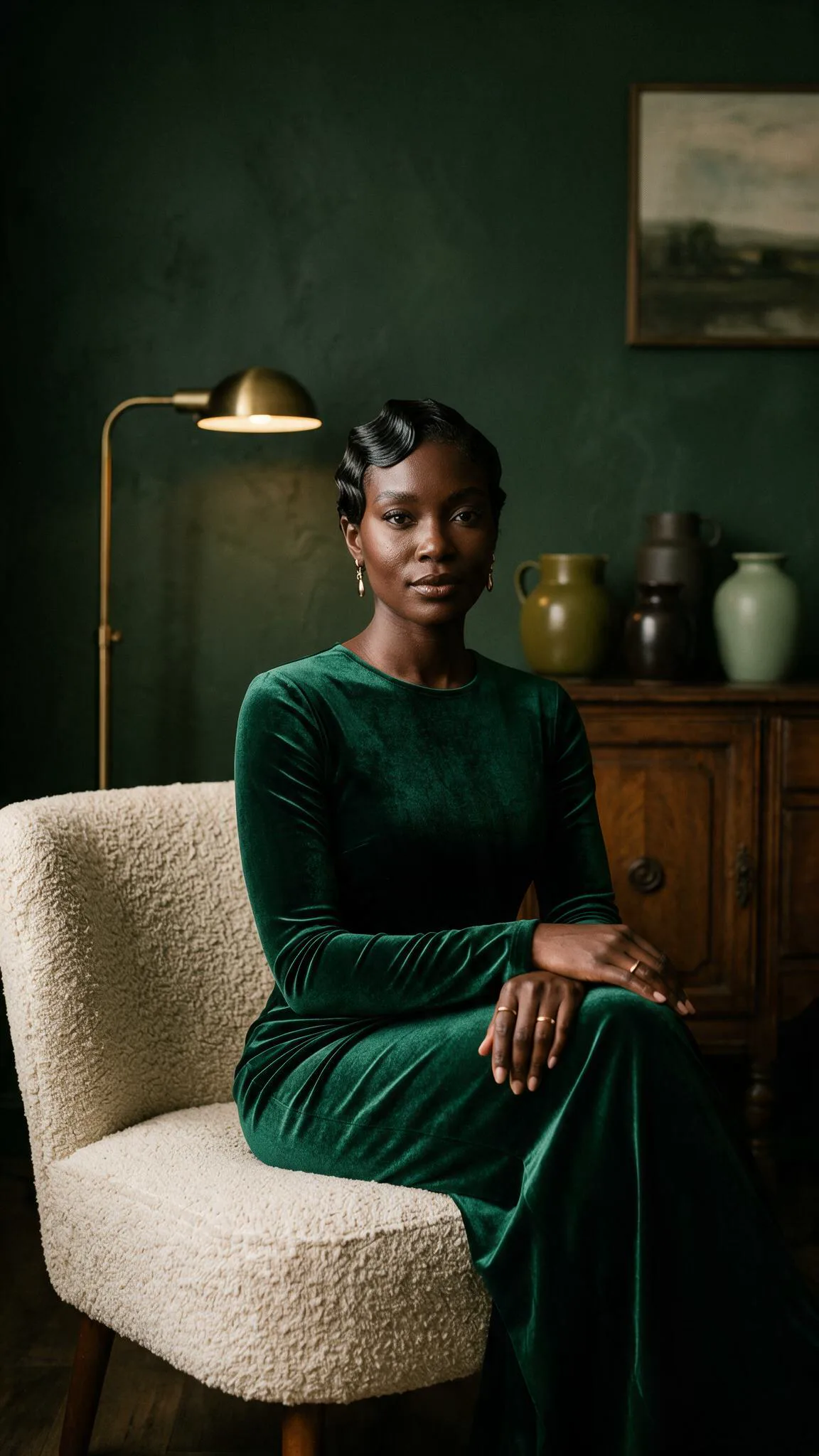
Every shade of dark skin can be rendered true in AI images once you stop accepting the default and start directing the light, the undertone and the person.
The default was never neutral
Long before AI, colour film and cameras were calibrated to a light-skinned reference card, the “Shirley” card, which left darker skin poorly rendered for decades (Roth, 2009). Today's image generators inherit that history. Bloomberg's 2023 analysis of more than 5,000 Stable Diffusion images found the model took racial and gender disparities to extremes worse than the real world. A NeurIPS 2023 study of more than 96,000 images from three systems found whiteness and masculinity over-represented. Rest of World's study of 3,000 Midjourney images found identities reduced to clichés. If AI images of dark skin come out grey, flat or lighter than life, the tool is not failing you at random. It is falling back on a default.
Describe depth, undertone and surface
Precise words keep skin from drifting. Name the depth, from golden brown and warm chestnut to rich mahogany and deep ebony. Name the undertone: red, golden or blue-black, warm, cool or neutral. Name the surface: visible pores, a soft sheen on the cheekbones, fine lines, freckles or marks. Google's 10-shade Monk Skin Tone Scale is a helpful planning reference for casting across the full range, but models respond to descriptive words, not scale numbers.
Light: expose for the skin
Most ashy or muddy results are lighting failures, not skin failures. Describe light as a photographer would: where it comes from, how soft it is and how warm. Ask for exposure set for the skin, with detail kept in the shadows, and add a thin rim of light wherever dark skin meets a dark background.
Hair is styling, not identity
Describe hair as a choice of style, finish and length: a glossy silk press, sculpted waves, knotless braids, a close crop, a silver chignon. Vary it across a campaign, as real people do, and never let one hairstyle stand in for a whole identity.
Settings without stereotypes
Place people in settings that are specific and true: a limewashed room, a fern glasshouse, a marble terrace, a modern studio. Specific details make an image feel intentional, and they refuse the clichés generators reach for by default.
Keep characters consistent across a campaign
Fix the anchors that make one person recognisable: age, face shape, features, hair, wardrobe and expression. Then change one thing at a time. If the skin is right but the light is wrong, rewrite only the light.
The Ash Test
Duplicate the image and view it in black and white at reduced brightness. Grey casts and flattened shadows show up at once. Then, in any editing app with a vectorscope, check that skin hues sit close to the skin-tone line: skin of every depth shares a similar hue and differs mainly in brightness and saturation.
Five prompts to try
- A woman in her late twenties with deep ebony skin and cool blue-black undertones, window light from the left, exposure set for her skin, a glossy silk press, forest-green plaster behind her.
- A man in his forties with rich mahogany skin and warm red undertones, soft overcast light on a stone terrace, a close crop and a linen shirt.
- A grandmother in her seventies with deep umber skin and golden undertones, natural age texture, a silver chignon, afternoon light in a quiet drawing room.
- A young woman with warm chestnut skin and freckles, knotless braids, golden-hour light in a fern glasshouse, a thin rim light on her shoulder.
- Two friends, one with golden-brown skin and one with deep ebony skin, both exposed correctly in the same soft studio light, true-to-life colour.
Consent, disclosure and honesty
AI images of people are concept work that people direct, not photographs of customers. Never present an AI person as a real customer, a testimonial or a result. The US Federal Trade Commission's rule banning fake reviews and testimonials took effect on 21 October 2024, and platforms such as Meta and TikTok label AI content. Secure written consent before referencing any real person's likeness.
Questions, answered
Why do AI tools make dark skin look grey or ashy?
Usually because of the light. Describe the light, set exposure for the skin and add a rim light, and most of that cast disappears.
Should I put skin-tone scale numbers in my prompts?
No. Use the scale to plan a varied cast, then describe depth, undertone and surface in words.
Explore Melanin True, the complete method, and join the waitlist for the free Skin Test.
Sources
- Roth, L. (2009). Looking at Shirley, the Ultimate Norm. Canadian Journal of Communication, 34(1).
- Nicoletti, L. and Bass, D. (2023). Humans Are Biased. Generative AI Is Even Worse. Bloomberg.
- Luccioni, A. S. and colleagues (2023). Stable Bias: Evaluating Societal Representations in Diffusion Models. NeurIPS 2023.
- Turk, V. (10 October 2023). How AI reduces the world to stereotypes. Rest of World.
- Google (2022). Improving skin tone representation across Google (the Monk Skin Tone Scale).
- US Federal Trade Commission (14 August 2024). Final rule banning fake reviews and testimonials.